Skip to content

Productivity · Coming soon

Llama Shift

The shift alarm app you buy once

Rotation calendar and alarms for iPhone and iPad. Built with AlarmKit so alarms ring through Silent mode and Focus. Set your rotation once and get 30 days of rolling alarms. Version 1.1.1 with build 11 and the one-time Pro purchase are in App Review, so the listing is presented as coming soon.

iOS · iPhone · iPadVersion 1.0Source record · November 2026

Built around a specific job.

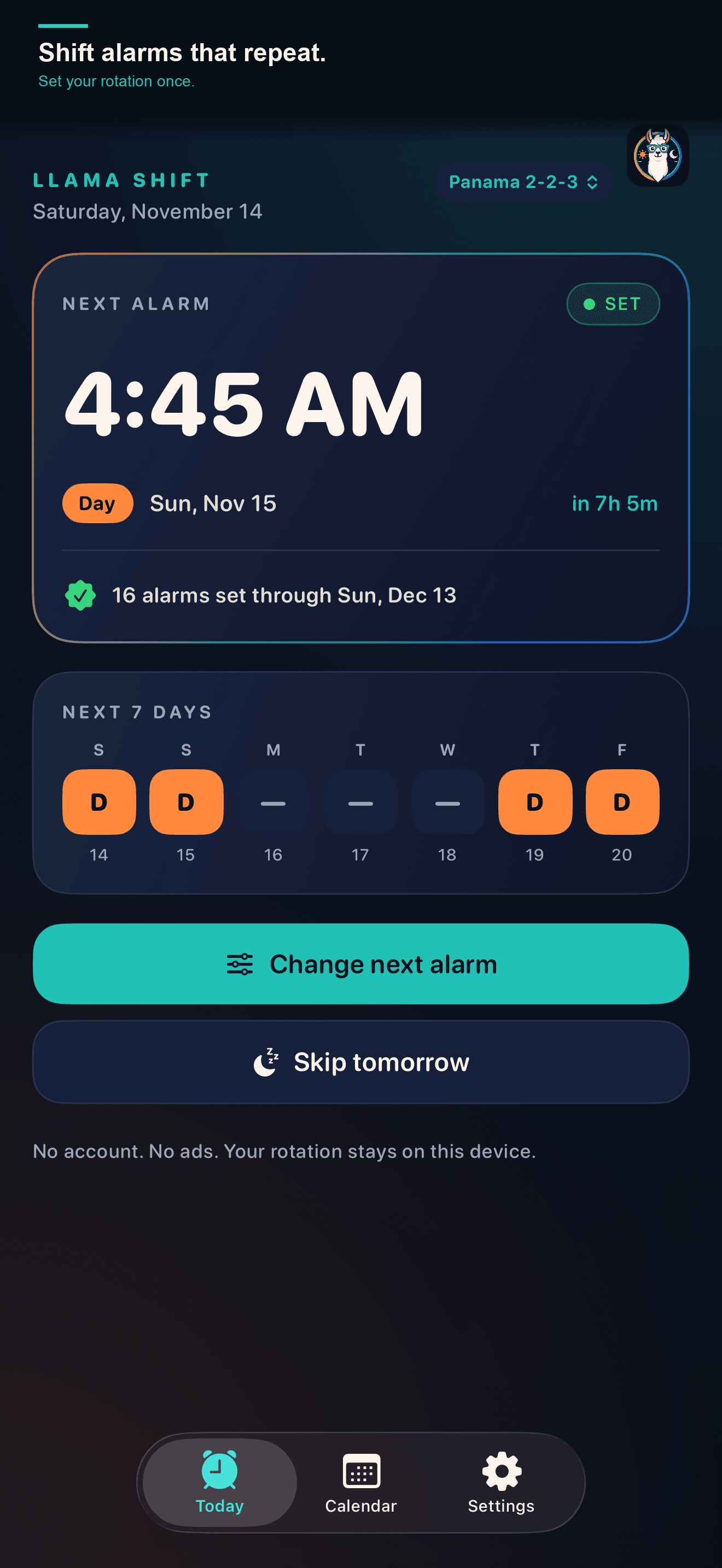
You work rotating shifts. Your phone forgets. Every week you set alarms manually, or worse, you miss a shift because Silent mode ate your alarm. Llama Shift fixes this. Set your rotation once using built-in templates (including police schedules like Pitman, 2-2-3, DuPont, Panama, 4-on-4-off, 24/48, 14/14, 21/7) or create a custom pattern. The app schedules 30 days of alarms that ring through Silent mode and Focus with AlarmKit. Add extra alarms for shift variations, edit multiple alarms at once, change a single day, sync your rotation to Calendar, and choose from six alarm sounds. Free for one rotation. Pro is $4.99 one-time with Family Sharing. No subscription. No account, no ads. Privacy: Data Not Collected.

Rotation calendar & alarms. Set your rotation once and get 30 days of rolling alarms.

  • AlarmKit alarms ring through Silent mode and Focus
  • One-time $4.99 purchase, no subscription
  • Police templates (Pitman, 2-2-3, DuPont, Panama) and custom rotations
  • Calendar sync, extra alarms, and bulk edit
  • No account, no ads. Privacy: Data Not Collected
Ways people use it
  • Set up a shift rotation once and let alarms schedule themselves
  • Use alarms that ring through Silent mode and Focus with AlarmKit
  • Choose from built-in rotation templates or create custom patterns
  • Add extra alarms for shift variations without breaking the rotation
  • View upcoming shifts in a calendar and sync the rotation to Calendar
  • Change a single day or the main alarm time without rebuilding the rotation

The working scope.

  • AlarmKit AlarmsAlarms that ring through Silent mode and Focusactive
  • Built-in Rotation TemplatesCommon shift patterns including police schedulesactive
  • Custom RotationsPro feature: custom patterns up to 56 daysactive
  • Calendar Sync & ExportSync your rotation to Apple Calendaractive
  • Extra AlarmsAdd alarms for shift variationsactive
  • Bulk EditChange multiple alarms at onceactive
  • Six Alarm SoundsChoose from six built-in alarm soundsactive
  • Custom Start DateStart your rotation on any dateactive
  • WidgetsShift information on your home screenactive
  • Shortcuts and App IntentsIntegrate with Shortcuts appactive
  • Privacy: Data Not CollectedYour schedule stays on your deviceactive
  • Fair PricingFree for 1 rotation, Pro is $4.99 one-timeactive
Feature details and benefits

AlarmKit Alarms

Built with AlarmKit so your shift alarms always ring, even when your phone is in Silent mode or Focus is active. No more missed shifts because you forgot to turn off Do Not Disturb.

  • Alarms ring through Silent mode
  • Alarms ring through Focus modes
  • Reliable wake-ups for shift workers

Built-in Rotation Templates

Choose from police schedules (Pitman, 2-2-3, DuPont, Panama), industrial patterns (4-on-4-off, 24/48, 14/14, 21/7), or create a custom rotation. Set your start date and alarm time, and you're done.

  • No manual alarm setup
  • Tested templates for police and industrial shifts
  • Quick setup for new users

Custom Rotations

Pro unlocks custom rotation patterns up to 56 days long, so you can match any schedule your employer uses.

  • Flexibility for unique schedules
  • Up to 56-day patterns
  • One-time purchase, no subscription

Calendar Sync & Export

Export your rotation to Apple Calendar so your shifts appear alongside your other events. Sync once and your rotation stays visible in Calendar, Reminders, and anywhere else that reads your calendar.

  • Rotation visible in Apple Calendar
  • Share your schedule with family
  • One-time export, always in sync

Extra Alarms

Sometimes your rotation needs an extra alarm. Add one-time or recurring extra alarms on top of your rotation schedule without breaking the pattern.

  • Handle shift variations
  • Keep your base rotation intact
  • Additive, not destructive

Bulk Edit

Edit alarm times across your entire rotation in one action. No more tapping through 30 days of alarms one by one.

  • Save time on schedule changes
  • Update rotation-wide in seconds
  • No repetitive tapping

Six Alarm Sounds

Pick from Bell, Chime, Dawn, Horn, Pulse, or Siren. Each sound is designed to wake you up reliably.

  • Variety without downloads
  • Tested for reliability
  • Built into the app

Custom Start Date

Set your rotation to start on the date you actually begin the pattern. No guessing or counting backwards from today.

  • Accurate rotation alignment
  • Start on your first shift
  • No manual adjustment

Widgets

Add Llama Shift widgets to your home screen to see your next shift without opening the app.

  • Glanceable shift information
  • No need to open the app
  • Stay informed at a glance

Shortcuts and App Intents

Use Llama Shift data in Shortcuts and Siri. Ask about your next shift or automate tasks based on your schedule.

  • Siri integration
  • Automation possibilities
  • Workflow flexibility

Privacy: Data Not Collected

Llama Shift collects no data. Your rotation, alarms, and preferences stay on your device. No account required, no ads.

  • No account required
  • No data collection
  • No ads

Fair Pricing

Use one rotation for free. Pro is a $4.99 one-time purchase with Family Sharing, no subscription.

  • No subscription
  • One-time purchase
  • Family Sharing included

Project details.

Llama Shift specifications
PlatformiOS · iPhone · iPad
AvailabilityComing soon
Version1.0
Source recordNovember 2026Synchronization date, not a capture or launch date
Who it is forNurses · Police officers · Firefighters · Factory workers · Security workers · Anyone on rotating shifts
Tools behind the buildSwiftUI · SwiftData · AlarmKit · WidgetKit · ActivityKit · App Intents · EventKit · StoreKit 2 · BackgroundTasks

Public update log.

Recorded update · 2026-11-19 · 1.1.1

Build 11 and the Pro purchase are in App Review

Version 1.1.1 with build 11 was submitted to App Review on 2026-11-19 03:27 UTC and is waiting for review, together with the one-time Pro purchase. Build 11 adds police rotation templates, additive extra alarms, bulk editing, calendar sync, and six normalized alarm sounds. The release also carries a background crash fix and a scheduling migration that cancels and rebuilds alarms left by older schedule formats. The App Store listing for app id 6834720494 has not resolved yet, so the package keeps status coming-soon.

  • Build 11 is attached to version 1.1.1 and the submission is waiting for App Review
  • The one-time Pro purchase is part of the same submission and is also waiting for review
  • Police rotation templates including Pitman, 2-2-3, DuPont, and Panama
  • Additive extra alarms on top of the rotation, with bulk edit and single-day changes
  • Calendar sync exports the rotation into a separate Llama Shift calendar
  • Six normalized alarm sounds
  • Background crash fix plus a scheduling migration that cancels and rebuilds alarms left by older schedule formats
Llama Shift updates
November 2026Build 11 and the Pro purchase are in App ReviewVersion 1.1.1 with build 11 was submitted to App Review on 2026-11-19 03:27 UTC and is waiting for review, together with the one-time Pro purchase. Build 11 adds police rotation templates, additive extra alarms, bulk editing, calendar sync, and six normalized alarm sounds. The release also carries a background crash fix and a scheduling migration that cancels and rebuilds alarms left by older schedule formats. The App Store listing for app id 6834720494 has not resolved yet, so the package keeps status coming-soon.

A useful idea of your own?

Start with the business task. We will work out what needs building and what belongs in the scope.

Discuss your project

Thursdays

Get the digest on Thursdays

Each Thursday: the shop notes and AI daily issues from the last seven days, and one product. Unsubscribe from any issue.